Step 07 - Function calling and Tools
The RAG pattern allows passing knowledge to the LLM based on your own data. It’s a very popular pattern, but not the only one that can be used.
In this step, we are going to see another way to give superpowers to the LLM: Function Calling. Basically, we will allow the LLM to call a function that you have defined in your code. The LLM will decide when and with which parameters to call the function. Of course, make sure that you do not allow the LLM to call a function that could be harmful to your system, and make sure to sanitize any input data.
Function calling
Function calling is a mechanism offered by some LLMs (GPTs, Llama…). It allows the LLM to call a function that you have defined in your application. When the application sends the user message to the LLM, it also sends the list of functions that the LLM can call.
Then the LLM can decide, if it wants, to call one of these functions with the parameters it wants. The application receives the method invocation request and executes the function with the parameters provided by the LLM. The result is sent back to the LLM, which can use it to continue the conversation, and compute the next message.
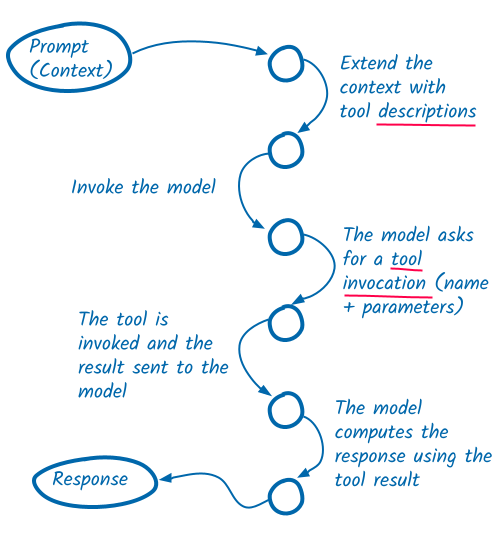
In this step, we are going to see how to implement function calling in our application. We will set up a database and create a function that allows the LLM to retrieve data (bookings, customers…) from the database.
The final code is available in the step-07 folder. However, we recommend you follow the step-by-step guide to
understand how it works, and the different steps to implement this pattern.
Configuring a datasource
For simplicity, we will use the same PostgreSQL database that we are using as the vector store. However, we now want to use it to store data for our AI service. In order to do this, we need to define a datasource in the AI service that will be used to manage connections to the database.
Open the src/main/liberty/config/server.xml file and add the following features to the list of features configured
for the server:
<featureManager>
    <platform>jakartaee-10.0</platform>
    <platform>microprofile-7.1</platform>
    <feature>cdi</feature>
    <feature>enterpriseBeansLite</feature>
    <feature>persistence</feature>
    <feature>restfulWS</feature>
    <feature>websocket</feature>
    <feature>mpConfig</feature>
</featureManager>
The persistence feature enables the Jakarta Persistence API (JPA) in the Liberty server at runtime. JPA simplifies data persistence and object relational mapping for Java applications. With JPA, our AI service can efficiently create, read, update, and delete objects from the database.
The enterpriseBeansLite feature enables a subset of the Jakarta Enterprise Beans 4.0 specification. While not directly related to persistence, we are going to use it to implement a simple startup bean that will import data into the database when the AI service is starting.
If you are following the step-by-step guide, copy the section-1/step07/src/main/liberty/postgresql directory to the
src/main/liberty/ folder in your working directory. The postgresql directory contains the PostgreSQL JDBC drivers
(postgresql-42.7.10.jar) that Liberty needs in order to connect to the database at runtime.
Finally, we need to define the datasource that the AI service will us. Add the following to the end of the
src/main/liberty/config/server.xml file:
<library id="postgresql-library">
    <fileset dir="${shared.resource.dir}" includes="*.jar" />
</library>

<dataSource id="default" jndiName="jdbc/postgresql">
    <jdbcDriver libraryRef="postgresql-library" />
    <properties.postgresql
        serverName="${vector.store.hostname}"
        portNumber="${vector.store.port}"
        databaseName="${vector.store.database}"
        user="${vector.store.username}"
        password="${vector.store.password}"
    />
</dataSource>
The postgresql-library tells Liberty where to find the PostgreSQL JDBC drivers at runtime. Note that it is referenced
by the definition of the datasource below.
Preparing the entities
Now that we have the dependencies, we can create a couple of entities. We are going to store a list of bookings in the database. Each booking is associated with a customer. A customer can have multiple bookings.
Create the dev.langchain4j.workshop.Customer entity class with the following content:
package dev.langchain4j.workshop;

import jakarta.persistence.Column;
import jakarta.persistence.Entity;
import jakarta.persistence.GenerationType;
import jakarta.persistence.GeneratedValue;
import jakarta.persistence.Id;
import jakarta.persistence.NamedQuery;
import jakarta.persistence.SequenceGenerator;
import jakarta.persistence.Table;

@Entity(name = "Customer")
@Table(name="customers")
@SequenceGenerator(name = "CustomerIdSequence", sequenceName = "customer_seq")
@NamedQuery(name = "Customer.getCustomers", query = "SELECT c FROM Customer c")
@NamedQuery(name = "Customer.findByFirstAndLastName", query = "SELECT c FROM Customer c WHERE c.firstName = :firstName AND c.lastName = :lastName")
public class Customer {

    @Id
    @GeneratedValue(strategy = GenerationType.SEQUENCE, generator = "CustomerIdSequence")
    @Column(name = "id", nullable = false)
    private int id;

    @Column(name = "first_name", nullable = false)
    private String firstName;

    @Column(name = "last_name", nullable = false)
    private String lastName;

    public int getId() {
        return id;
    }

    public void setId(int id) {
        this.id = id;
    }

    public String getFirstName() {
        return firstName;
    }

    public void setFirstName(String firstName) {
        this.firstName = firstName;
    }

    public String getLastName() {
        return lastName;
    }

    public void setLastName(String lastName) {
        this.lastName = lastName;
    }
}
Then create the dev.langchain4j.workshop.Booking entity class with the following content:
package dev.langchain4j.workshop;

import jakarta.persistence.Column;
import jakarta.persistence.Entity;
import jakarta.persistence.GenerationType;
import jakarta.persistence.GeneratedValue;
import jakarta.persistence.Id;
import jakarta.persistence.ManyToOne;
import jakarta.persistence.NamedQuery;
import jakarta.persistence.SequenceGenerator;
import jakarta.persistence.Table;

import java.io.Serial;
import java.io.Serializable;
import java.time.LocalDate;

@Entity(name = "Booking")
@Table(name="bookings")
@SequenceGenerator(name = "BookingIdSequence", sequenceName = "booking_seq")
@NamedQuery(name = "Booking.getBookings", query = "SELECT b FROM Booking b")
@NamedQuery(name = "Booking.getBooking", query = "SELECT b FROM Booking b WHERE b.id = :id")
@NamedQuery(name = "Booking.findBookingsByCustomer", query = "SELECT b FROM Booking b WHERE b.customer.firstName = :firstName AND b.customer.lastName = :lastName")
public class Booking implements Serializable {

    @Serial
    private static final long serialVersionUID = 1L;

    @Id
    @GeneratedValue(strategy = GenerationType.SEQUENCE, generator = "BookingIdSequence")
    @Column(name = "id", nullable = false)
    private int id;

    @ManyToOne
    Customer customer;
    LocalDate dateFrom;
    LocalDate dateTo;
    String location;

    public int getId() {
        return id;
    }

    public void setId(int id) {
        this.id = id;
    }

    public Customer getCustomer() {
        return customer;
    }

    public void setCustomer(Customer customer) {
        this.customer = customer;
    }

    public LocalDate getDateFrom() {
        return dateFrom;
    }

    public void setDateFrom(LocalDate dateFrom) {
        this.dateFrom = dateFrom;
    }

    public LocalDate getDateTo() {
        return dateTo;
    }

    public void setDateTo(LocalDate dateTo) {
        this.dateTo = dateTo;
    }

    public String getLocation() {
        return location;
    }

    public void setLocation(String location) {
        this.location = location;
    }
}
While we are at it, let’s create the dev.langchain4j.workshop.Exceptions class containing a set of
Exceptions we will be using:
package dev.langchain4j.workshop;

public class Exceptions {

    public static class CustomerNotFoundException extends RuntimeException {
        public CustomerNotFoundException(String firstName, String lastName) {
            super("Customer not found: %s %s".formatted(firstName, lastName));
        }
    }

    public static class BookingCannotBeCancelledException extends RuntimeException {
        public BookingCannotBeCancelledException(long bookingId) {
            super("Booking %d cannot be cancelled - see terms of use".formatted(bookingId));
        }

        public BookingCannotBeCancelledException(long bookingId, String reason) {
            super("Booking %d cannot be cancelled because %s - see terms of use".formatted(bookingId, reason));
        }
    }

    public static class BookingNotFoundException extends RuntimeException {
        public BookingNotFoundException(long bookingId) {
            super("Booking %d not found".formatted(bookingId));
        }
    }
}
Finally, because we are using vanilla JPA, we need to implement some boiler code that provides the management layer for our entities.
Create the dev.langchain4j.workshop.CustomerManager entity class with the following content:
package dev.langchain4j.workshop;

import dev.langchain4j.workshop.Exceptions.*;

import jakarta.enterprise.context.ApplicationScoped;
import jakarta.persistence.EntityManager;
import jakarta.persistence.NoResultException;
import jakarta.persistence.PersistenceContext;

import java.util.List;

import org.slf4j.Logger;
import org.slf4j.LoggerFactory;

@ApplicationScoped
public class CustomerManager {
    private static final Logger logger = LoggerFactory.getLogger(CustomerManager.class);

    @PersistenceContext
    private EntityManager em;

    public List<Customer> getCustomers(int offset, int limit) {
        return em.createNamedQuery("Customer.getCustomers", Customer.class)
            .setFirstResult(offset)
            .setMaxResults(limit)
            .getResultList();
    }

    public Customer findByFirstAndLastName(
        String firstName,
        String lastName
    ) throws CustomerNotFoundException {
        try {
            var customer = em.createNamedQuery("Customer.findByFirstAndLastName", Customer.class)
                .setParameter("firstName", firstName)
                .setParameter("lastName", lastName)
                .getSingleResult();
            return customer;
        } catch (NoResultException e) {
            logger.debug("Customer {} {} does not exist", firstName, lastName);
            throw new CustomerNotFoundException(firstName, lastName);
        }
    }
}
Then create the dev.langchain4j.workshop.BookingManager entity class with the following content:
package dev.langchain4j.workshop;

import dev.langchain4j.workshop.Exceptions.*;

import jakarta.enterprise.context.ApplicationScoped;
import jakarta.persistence.EntityManager;
import jakarta.persistence.NoResultException;
import jakarta.persistence.PersistenceContext;
import jakarta.transaction.Transactional;

import javax.sql.DataSource;
import java.util.List;

import org.slf4j.Logger;
import org.slf4j.LoggerFactory;

@ApplicationScoped
public class BookingManager {
    private static final Logger logger = LoggerFactory.getLogger(BookingManager.class);

    @PersistenceContext
    private EntityManager em;

    public List<Booking> getBookings(int offset, int limit) {
        return em.createNamedQuery("Booking.getBookings", Booking.class)
            .setFirstResult(offset)
            .setMaxResults(limit)
            .getResultList();
    }

    public List<Booking> findBookingsByCustomer(
        String firstName,
        String lastName,
        int offset,
        int limit
    ) {
        return em.createNamedQuery("Booking.findBookingsByCustomer", Booking.class)
            .setParameter("firstName", firstName)
            .setParameter("lastName", lastName)
            .setFirstResult(offset)
            .setMaxResults(limit)
            .getResultList();
    }

    public Booking getBooking(int bookingId) throws BookingNotFoundException {
        try {
            var booking = em.createNamedQuery("Booking.getBooking", Booking.class)
                .setParameter("id", bookingId)
                .getSingleResult();
            return booking;
        } catch (NoResultException e) {
            logger.debug("Booking {} does not exist", bookingId);
            throw new BookingNotFoundException(bookingId);
        }
    }

    @Transactional
    public void deleteBooking(int bookingId) {
        var booking = em.find(Booking.class, bookingId);
        if (booking == null) {
            throw new BookingNotFoundException(bookingId);
        }
        em.remove(booking);
    }
}
Populating the database
Alright, we have our entities and exceptions. But they are not very interesting unless we add some data to the database for our AI service to consume. Let’s go ahead and do that.
Create the src/main/resources/import.sql file with the following content:
-- Customers
CREATE SEQUENCE IF NOT EXISTS customer_seq;

-- Drop the customers table and recrete it
DROP TABLE IF EXISTS customers CASCADE;
CREATE TABLE IF NOT EXISTS customers (
    id INT PRIMARY KEY DEFAULT nextval('customer_seq') NOT NULL,
    first_name VARCHAR(255) NOT NULL,
    last_name VARCHAR(255) NOT NULL
);

INSERT INTO customers (id, first_name, last_name)
VALUES (1, 'Speedy', 'McWheels')
ON CONFLICT (id) DO NOTHING;
INSERT INTO customers (id, first_name, last_name)
VALUES (2, 'Zoom', 'Thunderfoot')
ON CONFLICT (id) DO NOTHING;
INSERT INTO customers (id, first_name, last_name)
VALUES (3, 'Vroom', 'Lightyear')
ON CONFLICT (id) DO NOTHING;
INSERT INTO customers (id, first_name, last_name)
VALUES (4, 'Turbo', 'Gearshift')
ON CONFLICT (id) DO NOTHING;
INSERT INTO customers (id, first_name, last_name)
VALUES (5, 'Drifty', 'Skiddy')
ON CONFLICT (id) DO NOTHING;

ALTER SEQUENCE customer_seq RESTART WITH 5;


-- Bookings
CREATE SEQUENCE IF NOT EXISTS booking_seq;

-- Drop the bookings table and recrete it
DROP TABLE IF EXISTS bookings;
CREATE TABLE IF NOT EXISTS bookings (
    id INT PRIMARY KEY DEFAULT nextval('booking_seq') NOT NULL,
    dateFrom DATE,
    dateTo DATE,
    location VARCHAR(255),
    customer_id INT,
    CONSTRAINT fk_bookings_customer_id
       FOREIGN KEY (customer_id)
       REFERENCES customers (id)
);

INSERT INTO bookings (id, customer_id, dateFrom, dateTo, location)
VALUES (1, 1, CURRENT_DATE + 1, CURRENT_DATE + 3, 'Verbier, Switzerland')
ON CONFLICT (id) DO NOTHING;
INSERT INTO bookings (id, customer_id, dateFrom, dateTo, location)
VALUES (2, 1, CURRENT_DATE + 14, CURRENT_DATE + 16, 'Sao Paulo, Brazil')
ON CONFLICT (id) DO NOTHING;
INSERT INTO bookings (id, customer_id, dateFrom, dateTo, location)
VALUES (3, 1, CURRENT_DATE + 30, CURRENT_DATE + 34, 'Antwerp, Belgium')
ON CONFLICT (id) DO NOTHING;

INSERT INTO bookings (id, customer_id, dateFrom, dateTo, location)
VALUES (4, 2, CURRENT_DATE + 2, CURRENT_DATE + 7, 'Tokyo, Japan')
ON CONFLICT (id) DO NOTHING;
INSERT INTO bookings (id, customer_id, dateFrom, dateTo, location)
VALUES (5, 2, CURRENT_DATE + 60, CURRENT_DATE + 65, 'Brisbane, Australia')
ON CONFLICT (id) DO NOTHING;

INSERT INTO bookings (id, customer_id, dateFrom, dateTo, location)
VALUES (7, 3, CURRENT_DATE + 3, CURRENT_DATE + 8, 'Missoula, Montana')
ON CONFLICT (id) DO NOTHING;
INSERT INTO bookings (id, customer_id, dateFrom, dateTo, location)
VALUES (8, 3, CURRENT_DATE + 35, CURRENT_DATE + 41, 'Singapore')
ON CONFLICT (id) DO NOTHING;
INSERT INTO bookings (id, customer_id, dateFrom, dateTo, location)
VALUES (9, 3, CURRENT_DATE + 90, CURRENT_DATE + 96, 'Capetown, South Africa')
ON CONFLICT (id) DO NOTHING;

INSERT INTO bookings (id, customer_id, dateFrom, dateTo, location)
VALUES (10, 4, CURRENT_DATE + 1, CURRENT_DATE + 6, 'Nuuk, Greenland')
ON CONFLICT (id) DO NOTHING;
INSERT INTO bookings (id, customer_id, dateFrom, dateTo, location)
VALUES (11, 4, CURRENT_DATE + 75, CURRENT_DATE + 80, 'Santiago de Chile')
ON CONFLICT (id) DO NOTHING;
INSERT INTO bookings (id, customer_id, dateFrom, dateTo, location)
VALUES (12, 4, CURRENT_DATE + 120, CURRENT_DATE + 127, 'Dubai')
ON CONFLICT (id) DO NOTHING;

ALTER SEQUENCE booking_seq RESTART WITH 12;

-- Drop the embeddings table. It will be recreated by the RAG ingestor
DROP TABLE IF EXISTS embeddings;
This will insert some data into the customers and bookings tables in the database. However, in order for this to
happen automatically during application startup, we need to add some code to the AI service. We are going to use some
MyBatis to help with this. Add the following dependency to your pom.xml file:
<dependency>
    <groupId>org.mybatis</groupId>
    <artifactId>mybatis</artifactId>
    <version>3.5.19</version>
</dependency>
Then create the dev.langchain4j.workshop.DataImporter.java file with the following content:
package dev.langchain4j.workshop;

import java.io.InputStream;
import java.io.InputStreamReader;
import java.sql.Connection;

import javax.sql.DataSource;

import org.apache.ibatis.jdbc.ScriptRunner;
import org.slf4j.Logger;
import org.slf4j.LoggerFactory;

import jakarta.annotation.PostConstruct;
import jakarta.annotation.Resource;
import jakarta.ejb.Singleton;
import jakarta.ejb.Startup;

@Singleton
@Startup
public class DataImporter {
    private static final Logger logger = LoggerFactory.getLogger(DataImporter.class);

    @Resource(lookup = "jdbc/postgresql")
    private DataSource dataSource;

    @PostConstruct
    public void importData() {
        logger.info("Importing data from import.sql");

        try ( Connection connection = dataSource.getConnection()
            ; InputStream is = getClass().getClassLoader().getResourceAsStream("import.sql")
            ) {
            ScriptRunner scriptRunner = new ScriptRunner(connection);
            scriptRunner.setSendFullScript(false);
            scriptRunner.setStopOnError(true);
            scriptRunner.setAutoCommit(true);
            scriptRunner.runScript(new InputStreamReader(is));
        } catch (Exception e) {
            e.printStackTrace();
        }
    }
}
As you can see, this class defines a startup EJB that will run when the AI service is stated. This startup bean obtains
a connection to the database, reads the import.sql script, and then executes the script against the database.
Note
The mechanism that we are using here to import data into the database is simply for demonstration purposes. In a real world scenario, it is likely the data already exists in the database or other, more robust, mechanisms would be used to import the data.
Defining Tools
Alright, we now have everything we need to create a function that allows the LLM to retrieve data from the database.
We are going to create a BookingRepository class that will contain a set of functions to interact with the database.
Create the dev.langchain4j.workshop.BookingRepository class with the following content:
package dev.langchain4j.workshop;

import dev.langchain4j.workshop.Exceptions.*;

import java.time.LocalDate;
import java.util.List;

import jakarta.enterprise.context.ApplicationScoped;
import jakarta.inject.Inject;
import jakarta.transaction.Transactional;

import dev.langchain4j.agent.tool.Tool;

@ApplicationScoped
public class BookingRepository {

    @Inject
    private BookingManager bookingManager;

    @Inject
    private CustomerManager customerManager;

    @Transactional
    @Tool("Cancel a booking")
    public void cancelBooking(int bookingId, String customerFirstName, String customerLastName) {
        var booking = getBookingDetails(bookingId, customerFirstName, customerLastName);

        // Too late to cancel
        if (booking.getDateFrom().minusDays(11).isBefore(LocalDate.now())) {
            throw new BookingCannotBeCancelledException(bookingId, "booking from date is 11 days before today");
        }

        // Too short to cancel
        if (booking.getDateTo().minusDays(4).isBefore(booking.getDateFrom())) {
            throw new BookingCannotBeCancelledException(bookingId, "booking period is less than four days");
        }

        bookingManager.deleteBooking(booking.getId());
    }

    @Transactional
    @Tool("List booking for a customer")
    public List<Booking> listBookingsForCustomer(String firstName, String lastName) {
        // Attempt to retrieve the customer with the specified first and last name
        var customer = customerManager.findByFirstAndLastName(firstName, lastName);

        // Now retrieve the bookings for the customer
        return bookingManager.findBookingsByCustomer(firstName, lastName, 0, 100);
    }

    @Transactional
    @Tool("Get booking details")
    public Booking getBookingDetails(int bookingId, String customerFirstName, String customerLastName) {
        var booking = bookingManager.getBooking(bookingId);

        if (  !booking.getCustomer().getFirstName().equals(customerFirstName)
           || !booking.getCustomer().getLastName().equals(customerLastName)
           ) {
            throw new BookingNotFoundException(bookingId);
        }
        return booking;
    }
}
The repository defines three methods:
cancelBookingto cancel a booking. It checks if the booking can be cancelled and deletes it from the database.listBookingsForCustomerto list all bookings for a customer.getBookingDetailsto retrieve the details of a booking.
Each method is annotated with the @Tool annotation. That is how we tell the LLM that these methods can be called. The
optional value of the annotation can gives more information about the tool, so the LLM can pick the right one.
Giving a toolbox to the LLM
Let’s now modify our AI service interface (dev.langchain4j.workshop.CustomerSupportAgent):
package dev.langchain4j.workshop;

import dev.langchain4j.cdi.spi.RegisterAIService;
import dev.langchain4j.service.MemoryId;
import dev.langchain4j.service.SystemMessage;
import dev.langchain4j.service.TokenStream;
import dev.langchain4j.service.UserMessage;

import jakarta.enterprise.context.ApplicationScoped;

@RegisterAIService(
    streamingChatModelName = "customer-support-agent",
    chatMemoryProviderName = "customer-support-agent-memory",
    contentRetrieverName = "doc-retriever",
    tools = { BookingRepository.class },
    scope = ApplicationScoped.class
)
public interface CustomerSupportAgent {

    @SystemMessage("""
            You are a customer support agent of a car rental company 'Miles of Smiles'.
            You are friendly, polite and concise.
            If the question is unrelated to car rental, you should politely redirect the customer to the right department.

            When calling tools or functions, strictly use JSON objects,
            do not wrap in quotes or use plain strings.

            Today is {current_date}.
        """
    )
    TokenStream chat(@MemoryId String sessionId, @UserMessage String userMessage);
}
We have added the tools attribute to the @RegisterAIService annotation. It lists the classes that contain the tools
that the LLM can call.
Also note that we have added a new placeholder {current_date} in the system prompt, so the LLM knows the current date
(and can apply the cancellation policy).
Prompt and templates
The system message and user messages can contain placeholders. The placeholders are replaced by the values provided by the application. You can pass parameters to AI service methods and include them in the prompt. This is a powerful feature to allow you to have advanced template logic.
Testing the function calling
Let’s test the function calling. Make sure the application is running (./mvnw liberty:dev).
Open your browser and go to http://localhost:9080. In the chatbot, let’s try the following interactions:
AI: Sure, I can help with that. I’ll need a bit more information to proceed: 1. Your first and last name to look up the booking. 2. The booking ID associated with your reservation. Please provide these details so I can assist you further.
My name is Speedy McWheels. But, I don't remember the booking ID. Can you list all my future bookings?
AI: Here are your upcoming bookings: 1. Booking ID: 1 - From: 2026‑06‑16 - To: 2026‑06‑18 2. Booking ID: 2 - From: 2026‑06‑29 - To: 2026‑07‑01 3. Booking ID: 3 - From: 2026‑07‑15 - To: 2026‑07‑19 Please let me know which booking you would like to cancel.
AI: Your booking from 2025-10-01 to 2025-10-07 has been successfully cancelled. If you need any further assistance, feel free to let me know!
Alright, let’s try now to cancel an invalid booking:
AI: Unfortunately, I cannot cancel your booking starting on 2025-07-10 because the booking period is less than 4 days, and cancellations are not permitted for such bookings. If you have any other questions or need further assistance, please let me know!
Conclusion
In this step, we explored how to implement function calling within our application, enabling us to create agents — LLMs that can not only reason but also interact dynamically with the system.
A function in this context is simply a method from your application annotated with @Tool. The actual implementation of
the function is entirely customizable. For instance, you could extend your chatbot with tools for weather forecasting
(by integrating with a remote service), personalized recommendations, or other external data sources. Additionally, you
can leverage more specialized LLMs, routing specific queries—such as legal or insurance-related questions—to models
trained in those domains.
Up to now, we have seen how you can expose business logic directly to an LLM, making methods callable as reasoning tools. This works great inside a single AI service, but what if you want to go a step further and share those tools across services, runtimes, or even different languages? In the next step, we’ll explore how to take this Agentic AI concept further with the Model Context Protocol.