Step 05 - Introduction to the RAG pattern
In this step, we will introduce the RAG pattern and implement it in our AI service. The RAG (Retrieval Augmented Generation) pattern is a way to extend the knowledge of the LLM used in the AI service.
The LLM is trained on a very large dataset. But this dataset is general and does not contain specific information about your company, your domain of expertise, or any information that could change frequently. The RAG pattern allows you to add a knowledge base to the LLM. This knowledge base can then be queried by the AI service to retrieve pieces of information that are relevant to the user input. The prompt is then augmented with this information before sending it to the LLM. The LLM uses the additional information when generating its response, hopefully reducing the possibility of hallucinations.
The AI service can use various methods to retrieve the relevant information. The most popular are:
- Full-text (keyword) search. This method searches for documents documents by matching the keywords in the user input against a database of documents, ranking the results based on the frequency and relevance of the keywords in each document.
- Vector search, also known as “semantic search”. This method converts text documents into vectors of numbers using embedding models and stores them in a vector database. At runtime, the AI service converts the user input into a vector using the same embedding model and then queries the vector database for similar vectors, thus capturing deeper semantic meanings.
- Hybrid. This method combines multiple search methods to improve the effectiveness of the search.
In this step, we will introduce the concepts of the RAG pattern, ingesting documents into an in memory vector store and adding a document retriever to our AI service to query documents from the store before invoking the LLM.
If you want to see the final result of this step, you can check out the step-05 directory.
RAG stages
The RAG pattern is composed of two distinct stages:
- Ingestion: This is the part that stores data in the knowledge base.
- Augmentation: This is the part that retrieves relevant information and adds it to the input of the LLM.
Ingestion
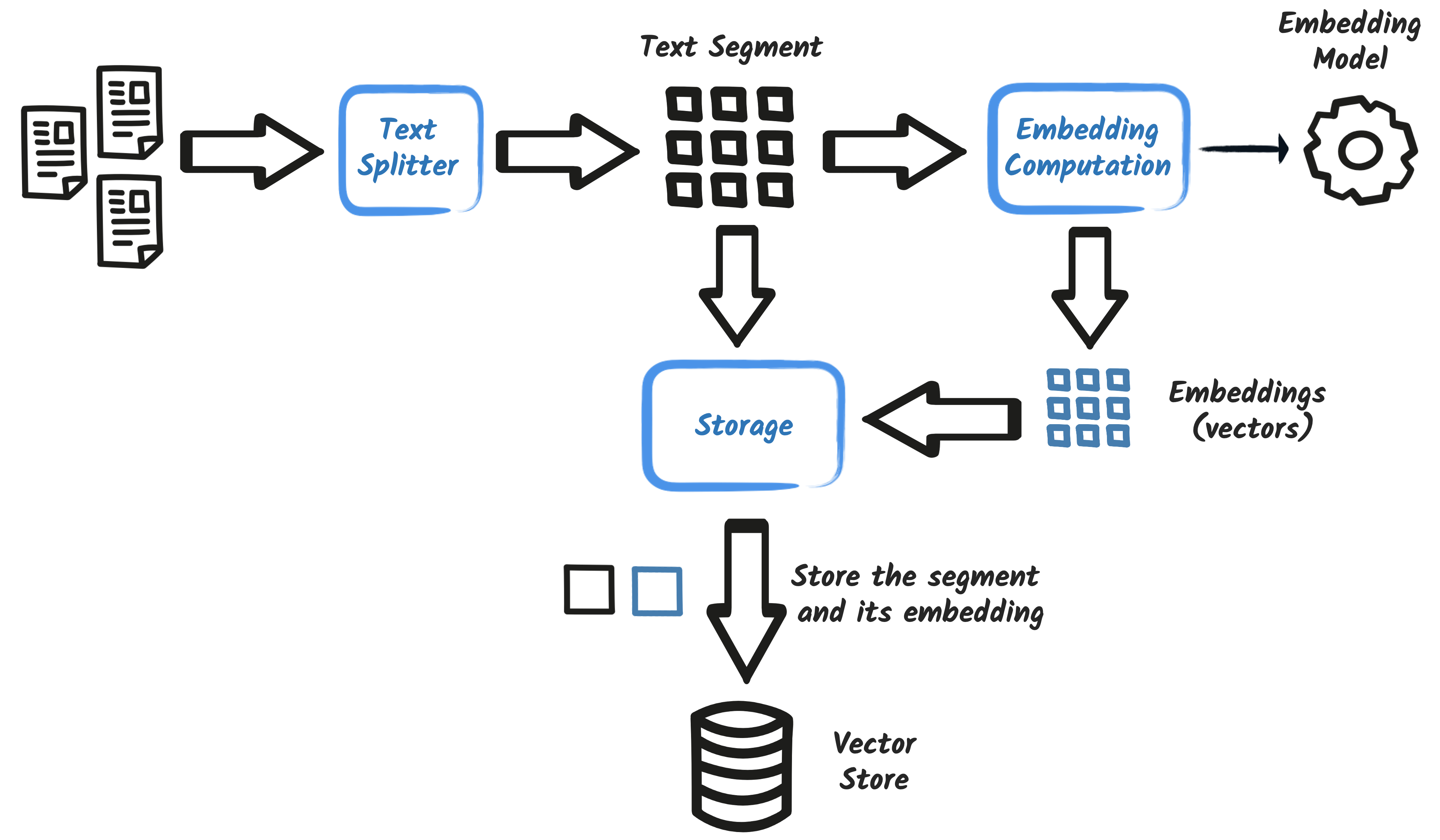
The ingestion process will vary depending on the on the information retrieval method. For vector search, the process involves splitting the documents into segements (also known as chunks), generating embeddings for the segments and then storing each embedding in the vector store, along with it’s segment.
Adding some data
The RAG pattern allows you to extend the LLM knowledge with your own data. So, let’s add some data.
Create a directory named rag in the src/main/resources directory.
Then, create a file named miles-of-smiles-terms-of-use.txt in the rag directory with the following content:
Miles of Smiles Car Rental Services Terms of Use

1. Introduction
These Terms of Service (“Terms”) govern the access or use by you, an individual, from within any country in the world, of applications, websites, content, products, and services (“Services”) made available by Miles of Smiles Car Rental Services, a company registered in the United States of America.

2. The Services
Miles of Smiles rents out vehicles to the end user. We reserve the right to temporarily or permanently discontinue the Services at any time and are not liable for any modification, suspension or discontinuation of the Services.

3. Bookings
3.1 Users may make a booking through our website or mobile application.
3.2 You must provide accurate, current and complete information during the reservation process. You are responsible for all charges incurred under your account.
3.3 All bookings are subject to vehicle availability.

4. Cancellation Policy
4.1 Reservations can be cancelled up to 11 days prior to the start of the booking period.
4.2 If the booking period is less than 4 days, cancellations are not permitted.

5. Use of Vehicle
5.1 All cars rented from Miles of Smiles must not be used:
for any illegal purpose or in connection with any criminal offense.
for teaching someone to drive.
in any race, rally or contest.
while under the influence of alcohol or drugs.

6. Liability
6.1 Users will be held liable for any damage, loss, or theft that occurs during the rental period.
6.2 We do not accept liability for any indirect or consequential loss, damage, or expense including but not limited to loss of profits.

7. Governing Law
These terms will be governed by and construed in accordance with the laws of the United States of America, and any disputes relating to these terms will be subject to the exclusive jurisdiction of the courts of United States.

8. Changes to These Terms
We may revise these terms of use at any time by amending this page. You are expected to check this page from time to time to take notice of any changes we made.

9. Acceptance of These Terms
By using the Services, you acknowledge that you have read and understand these Terms and agree to be bound by them.
If you do not agree to these Terms, please do not use or access our Services.
Alternatively, you can copy the miles-of-smiles-terms-of-use.txt file from the step-05/src/main/resources/rag
directory.
Note that we are adding a single file, but you can add as many files as you want in the rag directory. In our
implementation we will only support text files, but it is possible to process PDF, Word, or any other document format.
You just need to ensure that you use a suitable DocumentParser
implementation when ingesting the documents.
For example, the ApacheTikaDocumentParser is able automatically detect the file format and extract its textual content. The full
list of formats supported by the ApacheTikaDocumentParser is documented in the
Apache Tika documentation.
Configuring the ingestor
Now that we have some data, we need to configure our AI service to ingest it. In the
src/main/resources/META-INF/microprofile-config.properties file, add the following configuration:
customer-support-agent.rag.docs.dir=rag
customer-support-agent.rag.max-segment-size=100
customer-support-agent.rag.max-overlap-size=25
Let’s look at the configuration:
customer-support-agent.rag.docs.dir: The path to the directory containing the data files.customer-support-agent.rag.max-segment-size: Each document is split into segments (chunks) to be ingested by the LLM. This parameter defines the maximum number of tokens in a segment.customer-support-agent.rag.max-overlap-size: The maximum number of tokens to overlap between two segments. Each segment overlaps with the previous one by this number of tokens. This allows the LLM to have a context between two segments.
Embedding model
One of the core components of the RAG pattern is the embedding model. The embedding model is used to transform text into numerical vectors.
Selecting a good embedding model is crucial. We will use the all-minilm-l6-v2 embedding model.
Add the following dependency to your pom.xml file:
<dependency>
    <groupId>dev.langchain4j</groupId>
    <artifactId>langchain4j-embeddings-all-minilm-l6-v2</artifactId>
</dependency>
This dependency provides the all-minilm-l6-v2 embedding model. It will run locally on your machine. Thus, you do not
have to send your document to a remote service to compute the embeddings.
This embedding model generates vectors of size 384. It’s a small model, but it’s enough for our use case.
To use the model, we will use the dev.langchain4j.model.embedding.onnx.allminilml6v2.AllMiniLmL6V2EmbeddingModel class
in our document ingestor implementation.
Ingesting documents into the vector store
Now let’s create our ingestor. Remember that the role of the ingestor is to read the documents and store their embeddings in the vector store.
Create the dev.langchain4j.workshop.RAGDocumentIngestor class with the following content:
package dev.langchain4j.workshop;

import dev.langchain4j.data.document.Document;
import dev.langchain4j.data.document.loader.ClassPathDocumentLoader;
import dev.langchain4j.data.document.parser.TextDocumentParser;
import dev.langchain4j.data.document.splitter.DocumentSplitters;
import dev.langchain4j.data.segment.TextSegment;
import dev.langchain4j.model.embedding.EmbeddingModel;
import dev.langchain4j.model.embedding.onnx.allminilml6v2.AllMiniLmL6V2EmbeddingModel;
import dev.langchain4j.store.embedding.EmbeddingStore;
import dev.langchain4j.store.embedding.EmbeddingStoreIngestor;
import dev.langchain4j.store.embedding.inmemory.InMemoryEmbeddingStore;

import jakarta.enterprise.context.ApplicationScoped;
import jakarta.enterprise.context.Initialized;
import jakarta.enterprise.event.Observes;
import jakarta.enterprise.inject.Produces;
import jakarta.inject.Inject;

import java.net.URISyntaxException;
import java.util.List;

import org.eclipse.microprofile.config.inject.ConfigProperty;
import org.slf4j.Logger;
import org.slf4j.LoggerFactory;

@ApplicationScoped
public class RAGDocumentIngestor {
    private static final Logger logger = LoggerFactory.getLogger(RAGDocumentIngestor.class);

    @Produces
    private EmbeddingModel embeddingModel = new AllMiniLmL6V2EmbeddingModel();

    @Produces
    private EmbeddingStore<TextSegment> embeddingStore = new InMemoryEmbeddingStore<>();

    @Inject
    @ConfigProperty(name = "customer-support-agent.rag.docs.dir")
    private String ragDocsDir;

    @Inject
    @ConfigProperty(name = "customer-support-agent.rag.max-segment-size")
    private int maxSegmentSize;

    @Inject
    @ConfigProperty(name = "customer-support-agent.rag.max-overlap-size")
    private int maxOverlapSize;

    public void ingest(@Observes @Initialized(ApplicationScoped.class) Object pointless) throws URISyntaxException {
        long start = System.currentTimeMillis();

        // Create the embedding store ingestor
        EmbeddingStoreIngestor ingestor = EmbeddingStoreIngestor.builder()
            .documentSplitter(DocumentSplitters.recursive(maxSegmentSize, maxOverlapSize))
            .embeddingModel(embeddingModel)
            .embeddingStore(embeddingStore)
            .build();

        // Load the document(s) from the configured location and ingest them
        List<Document> docs = ClassPathDocumentLoader.loadDocuments(ragDocsDir, new TextDocumentParser());
        ingestor.ingest(docs);

        logger.info("Ingested {} docs in {}ms", docs.size(), System.currentTimeMillis() - start);
    }
}
This class ingests the documents from the customer-support-agent.rag.docs.dir location into the vector store. It runs
when the application starts (thanks to the @Observes @Initialized(ApplicationScoped.class) annotations specified on
the ingest method).
Additionally, it creates:
- the
AllMiniLmL6V2EmbeddingModelbean to generate the embeddings - the
InMemoryEmbeddingStorebean to store the embeddings
The ClassPathDocumentLoader.loadDocuments(ragDocsDir, new TextDocumentParser()) method loads the documents from the
given specified location in the WAR file.
The EmbeddingStoreIngestor class is used to ingest the documents into the vector store. This is the cornerstone of the
ingestion process. Configuring it correctly is crucial to the accuracy of the RAG pattern. Here, we use a recursive
document splitter with a segment size of 100 tokens and an overlap size of 25 tokens (as configured in the
microprofile-config.properties file).
Important
The splitter, the segment size, and the overlap size are crucial to the accuracy of the RAG pattern. It depends on the documents you have and the use case you are working on. There is no one-size-fits-all solution. You may need to experiment with different configurations to find the best one for your use case.
Finally, we trigger the ingestion process and log a message when it’s done.
Augmentation
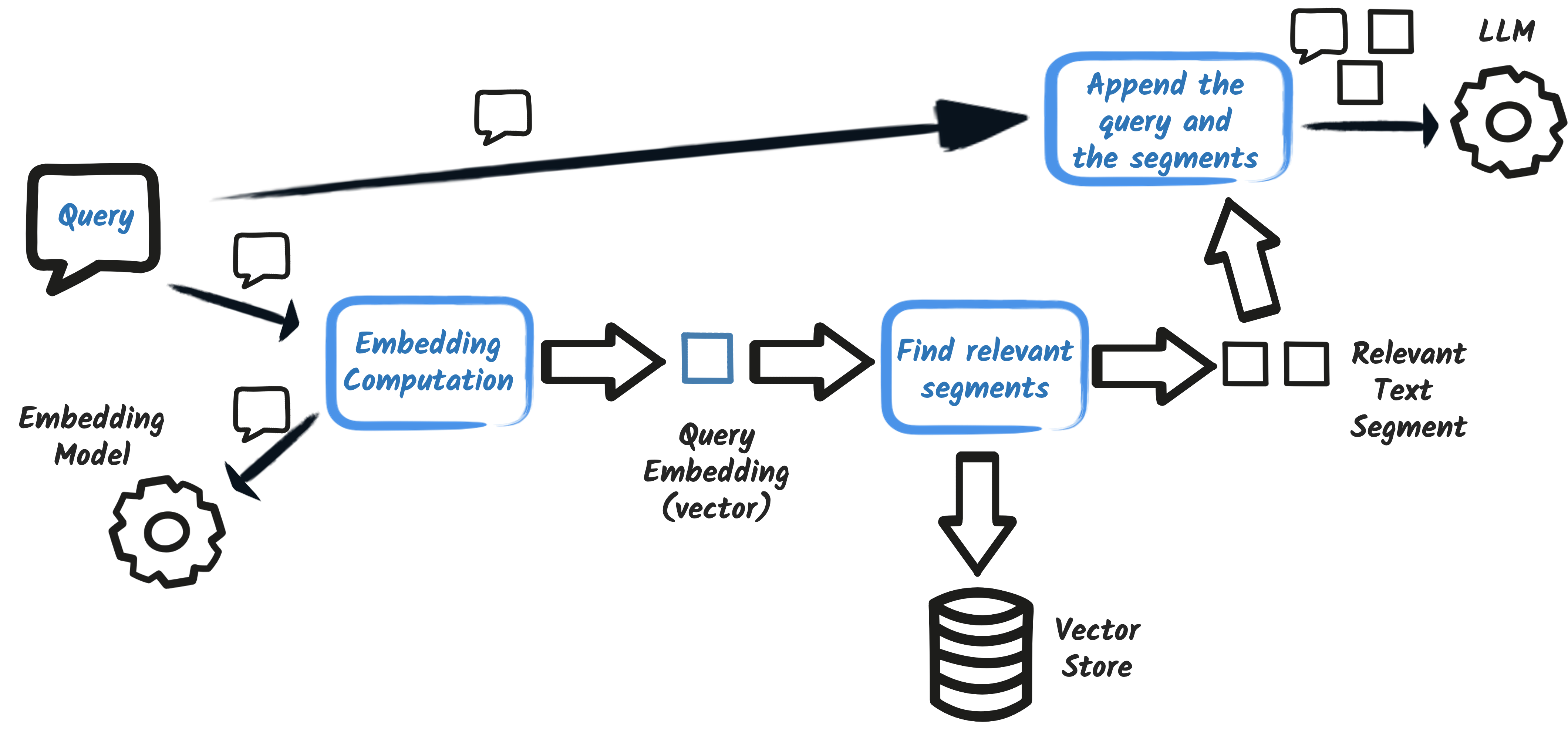
Now that we have our documents ingested into the vector store, we need to configure the retriever. The retriever is responsible for finding the most relevant segments for a given query. This will be used by DefaultRetrievalAugmentor when querying the vector store before augmenting the user prompt.
Configuring the retriever
We need to configure the content retriever that will be used by our AI service to. We will use LangChain4j CDI to create
the content retriever dynamically. In the src/main/resources/META-INF/microprofile-config.properties file, add the
following configuration:
dev.langchain4j.cdi.plugin.doc-retriever.class=dev.langchain4j.rag.content.retriever.EmbeddingStoreContentRetriever
dev.langchain4j.cdi.plugin.doc-retriever.config.embeddingStore=lookup:@default
dev.langchain4j.cdi.plugin.doc-retriever.config.embeddingModel=lookup:@default
dev.langchain4j.cdi.plugin.doc-retriever.config.maxResults=3
dev.langchain4j.cdi.plugin.doc-retriever.config.minScore=0.75
Let’s look at the configuration:
dev.langchain4j.cdi.plugin.doc-retriever.class: The content retriever implementation class. We will use the dev.langchain4j.rag.content.retriever.EmbeddingStoreContentRetriever provided by LangChain4j.dev.langchain4j.cdi.plugin.doc-retriever.config.embeddingStore: The embedding store the content retriever will query. The valuelookup:@defaultindicates that the default (unqualified) CDI bean should be used. This is theInMemoryEmbeddingStorebean created in theRAGDocumentIngestorclass because it is annotated with the@Producesannotation.dev.langchain4j.cdi.plugin.doc-retriever.config.embeddingModel: The embedding model the content retriever will use to generate emdeddings. The valuelookup:@defaultindicates that the default (unqualified) CDI bean should be used. This is theAllMiniLmL6V2EmbeddingModelbean created in theRAGDocumentIngestorclass because it is annotated with the@Producesannotation.dev.langchain4j.cdi.plugin.doc-retriever.config.maxResults: The maximum number of results to return when querying the vector store. We configure the maximum number of results to 3. Remember that more results means a bigger prompt. Not a problem here, but some LLMs have restrictions on the prompt (context) size.dev.langchain4j.cdi.plugin.doc-retriever.config.minScore: The minimum relevance score for the returned segments.
Important
It is crucial to use the same embedding model for the retriever and the ingestor. Otherwise, the embeddings will not match, and the retriever will not find the relevant segments.
Configuring the AI service
Finally, we need to update our AI service to use the content retriever configured above. This is as simple as specifying
a contentRetrieverName attribute on the @RegisterAIService annotation:
package dev.langchain4j.workshop;

import dev.langchain4j.cdi.spi.RegisterAIService;
import dev.langchain4j.service.MemoryId;
import dev.langchain4j.service.SystemMessage;
import dev.langchain4j.service.TokenStream;
import dev.langchain4j.service.UserMessage;

import jakarta.enterprise.context.ApplicationScoped;

@RegisterAIService(
    streamingChatModelName = "customer-support-agent",
    chatMemoryProviderName = "customer-support-agent-memory",
    contentRetrieverName = "doc-retriever",
    scope = ApplicationScoped.class
)
public interface CustomerSupportAgent {

    @SystemMessage("""
            You are a customer support agent of a car rental company 'Miles of Smiles'.
            You are friendly, polite and concise.
            If the question is unrelated to car rental, you should politely redirect the customer to the right department.
        """
    )
    TokenStream chat(@MemoryId String sessionId, @UserMessage String userMessage);
}
Testing the RAG pattern
Let’s test the RAG pattern. Run the application with the following command:
Ingestion and Embedding
When you start the application, you should see the following lines in the log :
[INFO] INFO ai.djl.util.Platform -- Found matching platform from: wsjar:file:/Users/msmiths/.m2/repository/ai/djl/huggingface/tokenizers/0.36.0/tokenizers-0.36.0.jar!/native/lib/tokenizers.properties
[INFO] DEBUG ai.djl.huggingface.tokenizers.jni.LibUtils -- Using cache dir: /Users/msmiths/.djl.ai/tokenizers/0.21.0-0.36.0-cpu-osx-aarch64
[INFO] DEBUG ai.djl.huggingface.tokenizers.jni.LibUtils -- Loading huggingface library from: /Users/msmiths/.djl.ai/tokenizers/0.21.0-0.36.0-cpu-osx-aarch64
[INFO] DEBUG ai.djl.huggingface.tokenizers.jni.LibUtils -- Loading native library: /Users/msmiths/.djl.ai/tokenizers/0.21.0-0.36.0-cpu-osx-aarch64/libtokenizers.dylib
[INFO] DEBUG dev.langchain4j.store.embedding.EmbeddingStoreIngestor -- Starting to ingest 1 documents
[INFO] DEBUG dev.langchain4j.store.embedding.EmbeddingStoreIngestor -- Documents were split into 39 text segments
[INFO] DEBUG dev.langchain4j.store.embedding.EmbeddingStoreIngestor -- Starting to embed 39 text segments
[INFO] DEBUG dev.langchain4j.store.embedding.EmbeddingStoreIngestor -- Finished embedding 39 text segments
[INFO] DEBUG dev.langchain4j.store.embedding.EmbeddingStoreIngestor -- Starting to store 39 text segments into the embedding store
[INFO] DEBUG dev.langchain4j.store.embedding.EmbeddingStoreIngestor -- Finished storing 39 text segments into the embedding store
[INFO] INFO dev.langchain4j.workshop.RAGDocumentIngestor -- Ingested 1 docs in 126ms
That data from the rag directory is being ingested. The files are read from the configured directory, split into
segments, and stored in the knowledge base. In our case, the knowledge base is in memory. We will see in the next
step how to use a persistent knowledge base.
The segments are not stored as-is in the knowledge base. They are transformed into vectors, also called embeddings. This is a way to represent the text in a numerical form. So, in the knowledge base, we have the text and the corresponding embeddings. These embeddings are computed using embedding models. We use the all-minilm-l6-v2 embedding model.
Augmentation
Let’s now go back to our chatbot and test the RAG pattern. Open the browser at http://localhost:9080. Ask a question related to the terms of use:
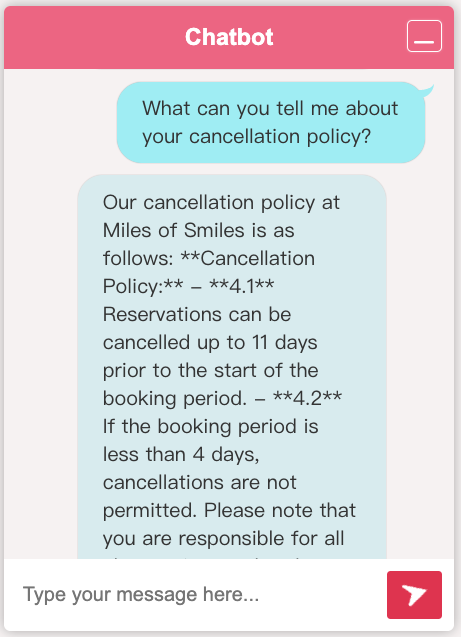
As you can see the AI is able to answer the question, and use the relevant segment from the knowledge base.
Let’s look at the logs. You should see the following lines:
{
    "role" : "user",
    "content" : "What can you tell me about your cancellation policy?\n\nAnswer using the following information:\n4. Cancellation Policy\n\n4. Cancellation Policy 4.1 Reservations can be cancelled up to 11 days prior to the start of the\n\nbooking period.\n4.2 If the booking period is less than 4 days, cancellations are not permitted."
}
The content starts with the user query, but then the AI service adds the relevant segment from the knowledge base. It
extends the prompt with the relevant information. This is the augmentation part of the RAG pattern. The LLM receives
the extended prompt and can provide a more accurate response.
Conclusion
In this step, we introduced the RAG pattern and implemented it in our AI service. We used an in memory vector store to store and query the embeddings.
In the next step, we will replace the in memory vector store with a persistent store to that can retain the embeddings between restarts.